A New Siri
Today Apple released iOS, iPadOS and macOS 27 with major performance improvements and several new features. Highlights is ready with support for Siri AI, a refined Liquid Glass design, resizable iPhone Mirroring and annotation comment icons. Update your devices and download Highlights 2026.2 to take full advantage of the new features.

Siri AI
Siri AI is whole new level of Siri. It can still perform actions on your behalf like “Open Highlights” or “Scan using Highlights”, but where it really shines is in performing more intricate requests. You can do fuzzy searches like “Search for PDF articles from the journal PNAS” or “Find the PDF where they discuss 3D paper based microfluidics”:

If you set Highlights as your default PDF reader the results will also be only one tap away.
Siri AI can also perform actions on the document you have open in Highlights like “Send this to …” or “Attach this PDF to an email with the title Paper-based microfluidics and a short summary”.
Furthermore, Siri AI can answer questions based on the content. You can ask e.g. if an article has supplementary information, if the authors have a website, or if they have published anything together recently:

You can talk or type to Siri AI. It is much better at understanding context than before and you do not need to choose your words as carefully. However, the accuracy of the answers can vary greatly, so it is important to validate the information. Siri AI requires a compatible device running iOS, iPadOS or macOS 27. Out of the gate, it is also limited to English and only available in certain markets.
Liquid Glass refinements
The 27 releases bring a refined Liquid Glass design to both interfaces and app icons. App icons are crisper due to sharper specular highlights and the level of Liquid Glass appearance of interface elements can now be changed by the user (Settings > Appearance > Liquid Glass) from clear to tinted:

On iPadOS 27, Highlights now shows the app name in the status bar, making it easier to tell the active app. You can also make the menu bar persistent like on macOS if you prefer. The number of menu bar items with images have been greatly reduced on both iPadOS and macOS to have them appear only when beneficial.
Additional improvements
When using your iPhone on your Mac via iPhone Mirroring, the window of Highlights can now be resized similar to iPad windows making it easier to work on a larger screen.
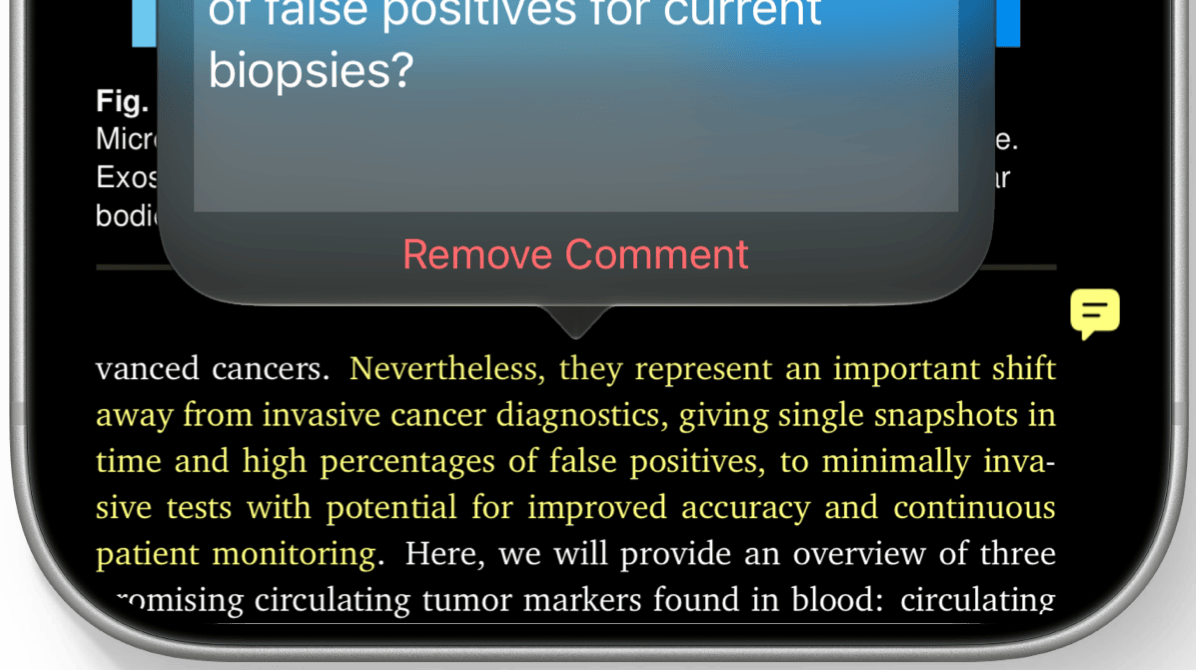
Annotations with comments now show a text bubble icon next to them in the PDF to make it easier to spot which have user added comments at a glance.
Finally, there are some more languages available for OCR and text recognition in image selections: Finnish, Hindi and Marathi.
Download iOS 27, iPadOS 27 and macOS 27 Golden Gate today and get the updated Highlights from the App Store to use the new features.